
GUIDE · 3 MINUTES
SSD or iFlash? Choosing your iPod's storage
Every iPod Classic and iPod Video has a mechanical hard drive inside: a spinning platter and a read head. After 15–20 years it is the part that fails most often, and also what slows the iPod down and drains the battery. Replacing it with solid-state storage is the upgrade that changes the experience the most. There are two options: SSD or iFlash.
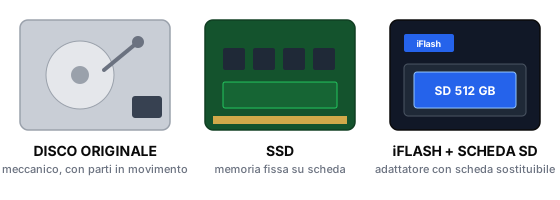
What SSD and iFlash have in common
- No moving parts: the iPod becomes silent and far more resistant to knocks and drops.
- Faster: power-on, track changes and menus without waiting.
- Longer battery life: solid-state storage draws far less power than a spinning drive.
- More space: up to 1 TB, versus the original 30–160 GB.
SSD: the fixed solution
A board with the memory soldered on, taking the drive’s place. Simple, reliable, with a great price per GB on small and medium sizes. The limit: the capacity is the one you choose at purchase. If you need more space in two years, the whole module gets replaced.
iFlash: the modular solution (our favourite)
iFlash is an adapter: it fits in the iPod in place of the drive and holds a regular SD or micro SD card, the same you would use in a camera. The card is the actual storage. That is why it is the solution we recommend:
- The most reliable option on the market: iFlash has been the reference standard for iPods for over ten years, with versions for every model.
- It is modular: the adapter stays in the iPod, the card can be swapped. Start with 256 GB today and move to 1 TB tomorrow by changing only the card.
- Cards are everywhere and keep getting cheaper: a future upgrade is inexpensive and doesn’t mean buying the module again.
- If a card fails, you replace the card, not the whole system.
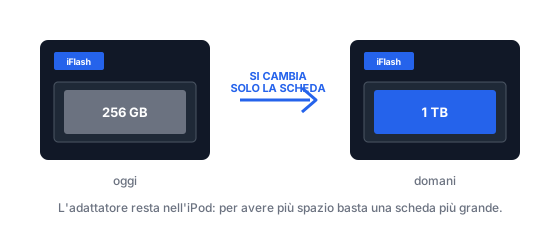
Quick comparison
| Original drive | SSD | iFlash | |
|---|---|---|---|
| Moving parts | Yes | No | No |
| Speed | Slow | High | High |
| Battery life | Baseline | Better | Better |
| Maximum capacity | 160 GB | 1 TB | 1 TB |
| Expandable later | No | No (module swap) | Yes (card swap) |
| Our advice | — | Good budget choice | Recommended choice |
Which one, in practice
- You want to spend the least and 128–256 GB will always be enough → SSD.
- You want the most solid option, or think you may want more space later → iFlash.
- You have a huge library (lossless, podcasts, audiobooks) → iFlash with a 512 GB or 1 TB card.
Ready to upgrade?
In the configurator, pick SSD or iFlash and the capacity, with up-to-date prices. Or add the upgrade to a repair.